
As an Amazon Associate we earn from qualifying purchases. This post contains affiliate links.
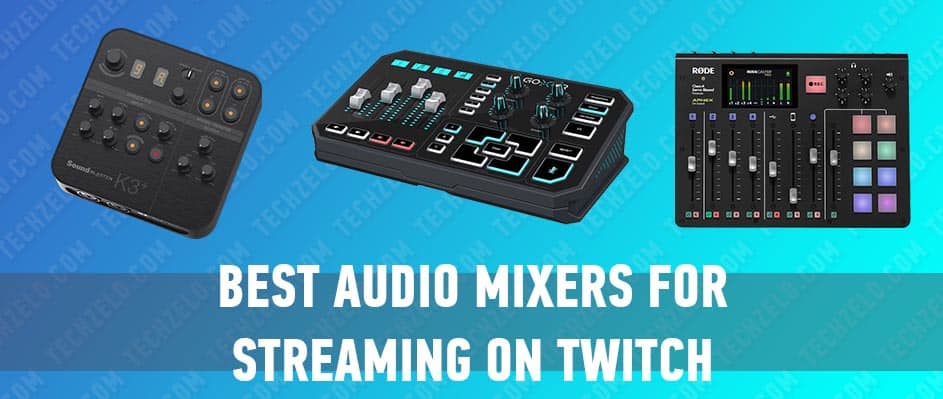
For Twitch streaming, the real decision isn’t “which mixer sounds best’ — it’s how you route audio. Most of these devices are less about a channel EQ and more about giving you clean voice, separate game/music/chat levels, and a reliable path into OBS. So choose on three things: whether you need a USB audio interface (PC in/out) or a standalone board, how many sources you juggle live, and whether you want one-touch sound effects and voice FX without alt-tabbing.
Quick steer: get the GoXLR if you want per-source faders, a mic preamp and a sampler built for streaming; get the RODECaster Pro if you run a podcast-style show or multiple guests; grab the Sound Blaster K3+ or Pyle PMXU63BT if you’re on a budget and mostly need a mic in with effects; and pick the Behringer XENYX 502 only if you already have a separate way to get audio into your PC.
Quick comparison
| Product | Type | Best for | PC connection |
|---|---|---|---|
| TC-Helicon GoXLR | Streaming mixer + USB interface | Streamers wanting per-source faders, mic FX and a sampler | USB (built-in) |
| Creative Sound Blaster K3+ | Compact USB mic mixer | Solo streamers on a budget who want easy mic effects | USB (built-in) |
| Behringer XENYX 502 | Small analog mixer | Basic mic + line mixing when you already have an interface | Analog out (needs separate interface) |
| Rode RODECaster Pro | Standalone podcast/stream console | Multi-mic shows, guests and call-ins | USB (built-in) |
| Pyle PMXU63BT | Budget USB/Bluetooth mixer | Entry-level setups mixing mic, music and Bluetooth | USB (built-in) |
What is the Best Audio Mixer for Streaming
The mixer you use for streaming on Twitch should match the needs of streaming. This means it should be chosen based on factors specific to streaming. You can find suitable mixers online or in stores that sell sound equipment and musical instruments. The staff at these stores can usually assist you in finding the best option.
But there are several questions that a potential buyer faces initially. They can be answered immediately. And then move on to the main criteria for the selection of equipment.
Firstly, the price. The user does not need large-scale studio solutions in this case, and he can buy a reliable portable model of an audio mixer for streaming, for example, for $ 100-200. Some specialized models have advanced functionality and are somewhat more expensive. This is the best and right price range for this category of devices.
There is also the issue of the number of channels. On the one hand, the more the better. On the other hand, the portability of the device may lose, and the price may be too high. It is important to decide on their needs. If the user streams and uses only voice for this, a 2-channel system is enough. If the user adds effects in the form of background sounds and other things, then larger-scale solutions will be needed. Do you plan to develop the quality and complexity of your own streams in the future? The answer to this question leads to the answer to the number of channels.
And this list of factors can be continued.
How to Choose the Best Mixer for Twitch Streaming
Now let’s pay attention to the key technical factors in choosing equipment in this category.
There are many settings you can adjust, which is important for making choices. On one hand, there shouldn’t be too many settings like in professional studios. But having too few settings is also not good. It’s helpful to have options for controlling volume and adjusting sound frequencies. And it’s important to keep things simple so even beginners can use it. Remember, not everyone using streaming services is a sound expert.
You should also separate analog and digital mixers. Generally speaking, it is better to control analog mixers live, and digital audio mixers have more settings and are used more often for recording podcasts. Digital models are easier to use if you have a steady skill in working with them, and it will be easier for a complete beginner to start with an analog mixing console.
And we must not forget the dimensions of the devices. The user makes a choice according to the situation. Portable models for home or regular outdoor events are optimal. If a person has the opportunity to create a mini-studio in a separate place, then he can also purchase larger devices.
The Top 5 Best Audio Mixers for Streaming
Now, let’s focus on picking out some mixer models that are perfect for streaming on Twitch. We’ll consider the factors we talked about earlier, like size, weight, price, and features. There’s a wide range of options out there, and every streamer’s needs are different. So, we suggest checking out a few top-rated solutions that have received positive feedback from users. This way, you can figure out what’s important to you and compare different mixers more easily. Who knows, maybe the perfect mixer for you is on this list!
GoXLR

Compact 4-channel mixer with a built-in sound interface. It is designed for broadcasting and streaming.
The device is equipped with 4 motorized faders with small displays, 4 rotary controls, and a set of buttons. All controls have a customizable RGB backlight and can be adjusted at the discretion of the user. The GO XLR has one Midas mic preamp. For voice processing, a set of effects is available, which includes equalizers, compressorsvocoders, etc.
You can customize the effects with physical controls, as well as through the application that comes with the interface. For GO GO XLR switching, there are: XLR and Mini Jack microphone inputs, Mini Jack line input, Mini Jack line output, headphone output, S / PDIF input.
Features: motorized faders let you control mic, game, music, chat, and more for the perfect Broadcast mix, studio quality MIDAS preamp, record samples on-the-fly or load your own audio files to engage and entertain your community, additional effects
Pros: high power, huge range of customization options, highest sound quality
Cons: slightly overpriced
Creative Sound Blaster K3+0.
Sound Blaster K3 + has a USB sound interface from Singapore-based Creative. It was initially available only in the Chinese market; The model was also released in the United States more recently. The device has standard functionality and switching for this category of audio cards.
Sound Blaster K3+ has 2 hybrid XLR / Jack inputs, a linear input for connecting power tools, as well as a pair of headphone outputs. The compact and easy-to-use audio card allows you to not only record the signal, but also apply various effects (auto tuning, reverb, delay). K3+ processes a signal with 16/24 bit 48 kHz quality. This audio interface does not require the installation of additional drivers.
The built-in auto-tuning effect allows user to direct the vocalist’s singing in accordance with the notes of the key of the work, which can be useful for recording and performing karaoke songs. Pay attention to the switching of the minor / major parameter, which is an important setting for the auto-tuning effect.
Features: simple USB connection to PC or Mac, XLR Phantom Power: Provides up to 48V phantom power to drive condenser microphones for clear, studio-grade recording quality, nine Adjustable Reverb Effects, soundboard clips/ pitch correction effects
Pros: high quality, a lot of reverberation effects, affordable price
Cons: 2 channels only, uninteresting design
Behringer Xenyx 502
This device is useful for recording novice musicians, Internet broadcasters and just ordinary users. The device comes in a classic way with a user manual, a USB cable and a power adapter. In addition, for working with a computer, the option of free download of a digital workstation Tracktion is provided.
The main feature of the model is the presence of a Xenyx microphone preamplifier. In addition, phantom power can be supplied to the first channel to work with condenser microphones. Another hallmark of the model is the presence of a single-band compressor. This point will be more useful for live performances using the remote control and recording podcasts. Q502USB contains 5 input channels and 2 output. The USB is associated with an additional section of 2-TRACK RCA connectors (a pair of input and output) and sent to the headphones and / or mix using two buttons in the corresponding section.
Features: premium ultra-low noise, XENYX Mic Preamp, neo-classic “British” 2-band EQ for warm and musical sound, main mix, stereo CD/tape plus separate headphone outputs
Pros: low price, five channels, high enough quality
Cons: lack of functionality
Rode RODECaster Pro
Rode RODECaster Pro is a digital mixer designed to create and record podcasts. The device is unique in that it combines the capabilities of a mixer, portable recorder, audio interface and controller. With the growing popularity of video blogs, podcasts and a variety of collective streams, RODECaster Pro looks quite relevant and in demand.
The RODECaster Pro boasts a large, bright touchscreen display, simple controls and the ability to record phone calls. The smartphone can be connected via Bluetooth or a four-pin mini-jack. For both options, full-fledged inputs with individual settings and a separate level control are provided. In addition, the Rode mixer is equipped with pads to quickly launch jingles and four headphone outputs.
Features: 4 microphone XLR inputs with A class preamps, 4 headphone outputs, USB input, 8 faders, 8 RGB pads, touch screen controls, APHEX Exciter and Big Bottom sound processing tools
Pros: very portable, universal set of inputs and settings, robust design
Cons: too expensive for non-professionals, not enough built-in effects
Pyle Professional 4-Channel USB Mixer
Another reasonably priced solution that comes in handy as the first mixing console for the podcast. There is a simple and quick connection to a PC and Mac via Bluetooth and USB cable. XLR / TRS combo inputs and a 3-band equalizer are also included for added processing. An important feature of the model is its compactness and practical design, which makes the mixer convenient for regular transportation. It is possible to use phantom power. Also features FX reverb with 16 settings.
Features: usb/mp3 comparability, Bluetooth wireless streaming, solid metal design, microphone, and stereo line inputs
Pros: robust design, a large selection of user settings
Cons: no microphone mute buttons
FAQ
Do I actually need a mixer to stream on Twitch? No — a single USB mic works fine to start. A mixer earns its place once you want independent control of game, music, chat and mic levels, or one-touch sound effects and voice FX without switching windows.
What’s the difference between a USB mixer and an analog mixer like the XENYX 502? A USB mixer (GoXLR, RODECaster, K3+, Pyle) plugs straight into your PC and appears as an audio device, so OBS can use it directly. An analog board like the XENYX 502 has no USB, so you need a separate audio interface to get its output into your computer.
Can these mixers keep game, music and voice on separate channels for OBS? The GoXLR is built specifically for this, giving each source its own physical fader and separate output. The RODECaster Pro also handles multiple sources well, while the smaller K3+, XENYX and Pyle units are better suited to simpler mic-plus-music setups.
Which of these is best for a podcast-style stream with guests? The RODECaster Pro, since it’s designed around multiple microphones, headphone outputs and call-in audio. It’s more than a solo streamer needs but ideal once you have co-hosts or remote guests.
I’m on a tight budget — where should I start? The Creative Sound Blaster K3+ and Pyle PMXU63BT are the entry points here, both connecting over USB and covering a mic plus music. Start there, and step up to a GoXLR later if you find yourself wanting proper per-source faders and FX.
Conclusion
“Choose by your routing needs, not channel count: decide whether you need a built-in USB interface, how many live sources you mix, and whether one-touch FX matter. The TC-Helicon GoXLR is the standout for dedicated solo streamers who want per-source faders and voice effects; the Rode RODECaster Pro is the pick for multi-mic and guest shows; and the Creative Sound Blaster K3+ is the sensible budget entry for a clean mic setup you can grow from.”
Twitch streams have become a popular form of entertainment, with a wide audience and significant monetization potential. To ensure the best possible user experience, it is important for streamers to have high-quality audio equipment, such as a mixer. When choosing an audio mixer for streaming on Twitch, it is important to consider several factors, including price, number of channels, configuration options, and size and weight.
Analog mixers are typically easier to control live, while digital mixers offer more settings and are often used for recording podcasts. It is important to choose a mixer that meets the specific needs of the user and their skill level.
There are many options available when it comes to audio mixers for Twitch streaming, and it is important for the user to research and consider their needs before making a decision. Some of the top options include portable models with advanced functionality, as well as larger models with a wider range of settings. Ultimately, the best audio mixer for streaming on Twitch will depend on the individual needs and goals of the user. Overall, a high-quality audio mixer is an essential tool for any streamer looking to provide a professional and enjoyable experience for their audience.
So, you’re diving into the streaming world, huh? Ready to mix it up? Well, fear not, because we’ve got the lowdown on the best audio mixers for your Twitch adventures. Let’s face it, nobody wants to tune into a stream where the audio sounds like it’s coming from the bottom of a well. That’s where these mixers come in handy.